


I know this is supposed to be an art blog, but as soon as you introduce a computer, the lines between art and engineering start to get blurred. Regardless, I found this Flash AS3 Memory Leak to be such a landmine that I just had to post it somewhere for other people to hopefully find and breath a sigh of relief when they realize why their flash game slows down and grinds to a halt the longer they play it.
Okay, no beating around the bush. Do this code once a frame (or more!) and you're flash game will grind to a halt.
mySprite.graphics.beginFill( 0xFFFFFF );
mySprite.graphics.drawRect( vPos.x, vPox.y, vSize.x, vSize.y );
mySprite.graphics.endFill();
This was my "DrawBlock" function for my falling blocks game. I see these three lines posted all over the web in tutorial and in forums. --Worse, I often only see the first two lines and no endFill(). The above code eats memory.
This code will NOT eat memory:
mySprite.graphics.clear(); // <--- required.
mySprite.graphics.beginFill( 0xFFFFFF );
mySprite.graphics.drawRect( vPos.x, vPox.y, vSize.x, vSize.y );
mySprite.graphics.endFill();
Okay, now I'll begin my rant / explanation of the problem and solution.
In 8 years of making professional console games I've never seen a drawRect function eat memory. I'm talking, SNES, Playstation, PS2, Xbox, PS3, Xbox360 --none of them had any reason to use more memory to fill some offscreen pixels with color. So I found this result in Flash, not only unexpected, but jaw-dropping.
"drawRect" should do exactly what it says it does. In a console game engine, we would create a new sprite (or something of that effect) and the engine would grab a piece of memory for that sprite. This would happen once. After the sprite has some memory to draw on, there's no need to ever get more.
Imagine if you will, a simple square piece of paper --like one of those note pads you most likely have on your desk. Saying "create a new sprite" is like pulling off the top sheet of paper and putting it on the desk in front of you so you can use it.
After that, you can scribble on that piece of paper as much as you want and as often as you want. You can draw a rectangle as many times as you want in as many colors as you want but you only ever use ONE piece of paper. And if the paper is too full, you can always erase it or cover the thing with white out or something that allows you to continue to use ONE piece of paper.
In computer terms, that piece of paper is a piece of memory, and drawing on it is *ultimately* like changing the color of pixels. It doesn't matter how many times you draw and change the color of the pixels, you'll always have the same number of pixels in your sprite. The idea of a "drawRect" function taking more memory with each call is a big giant "WTF!" because there's no need for it.
Now, here's my hypothesis on why flash's drawRect function is eating up memory. (notice I said "hypothesis") I believe that flash's "drawRect" function is really an "addDrawRect" function for one simple reason: Flash obviously capitalizes on vector graphics.
I believe "drawRect" doesn't draw a rect at all, I think it just adds a rectangle shape to a list of things to draw when this sprite is told to draw to the screen (later in the frame). Basically, every time you call drawRect, imagine pulling another sheet of paper off your notepad and placing it on top of what you already have in front of you. Each one on of these pieces of paper would have one shape drawn on it. Before long you will have a stack of paper in front of you because, however thin paper is, it adds up.
And that's it. In console games, drawing a sprite is usually as simple as copying the sprite's pixels to the screen (aka screen buffer), while drawing a sprite in flash basically runs through a list of every shape in a list and then draws it to the screen based on what the vector math for that shape tells it to do.
So in console games, rather than calling a clearRect or clearSprite function every frame, we literally just drop a new color right on top of the old. If a block in my tetris board is red and should be changed to blue, then we just draw blue over the red data because clearing the data and then drawing it blue takes twice as long.
With flash, if I used my little draw block function to change the color of a block every frame, the first frame Flash would draw 1 rect (say, red), the second frame Flash would draw 2 rects directly on top of each other (red and then the second color, like blue), on the third frame Flash would draw 3 times (red, blue, and 3rd color), forth frame -4 rects, etc...
Here's the catch --drawing (aka copying or writing to memory) is the SLOWEST part of a game. It's the reason we have expensive graphics chips that bench-test based on how many polys they can draw in a frame.
So, in the end, Flash is quite the opposite of what I've seen in the past. Rather than finding tricky ways to skip the "clear" function, I should use it every chance I get.
so... the next time you use "drawRect" in Flash, think of it as "addDrawRect".
Thanks for reading,
~Danny
PS: my Falling Blocks flash game.
Saturday, May 24, 2008
Flash AS3: graphics.drawRect Memory Leak


 Labels:
Flash Game,
Observation
Labels:
Flash Game,
Observation
Friday, May 9, 2008
Comicking, by Emma

Labels:
Draw,
Observation
Saturday, March 8, 2008
NEVER USE Network Solutions! -EVER!
Serously, pass this post on to everyone you know. I'm furious because I know they just screwed me. but the average person who's never bought a domain name before won't know the difference. I HATE seeing companies screw people just because they know they can get away with it.
if you have a domain name you're thinking about getting NEVER search for it using NetworkSolutions.com!! they will lock the domain as if a customer is buying it (ie, you) and then try to charge you $35 for it! when the going rate on other sites, like godaddy, is $9 or $10.
but since I searched with NetworkSolutions first, now GoDaddy can't register it because NetworkSolutions put a lock on the domain... all GoDaddy can do is offer to "buy on back order" for $20.
NEVER USE Network Solutions. They will Screw You instantly.
Can you tell, I'm furious!? I just had to pay the $35 and now I know I'm going to have to pay another $12 to transfer the domain name to the host I normally use simply because I thought it would be easy to do a quick search on domain names at Network Solutions (rather than log into my account with my current host.)
instead of paying $9, I'll be paying $48 ($35+$12)!
I repeat, NEVER USE Network Solutions. When I called in and asked WTF!!? the woman said "it's standard, $35 PER YEAR for a domain name with network solutions." I said "why? other sites charge $9. What is Network Solutions going to give me that's worth $35?", she said "well you get access to the network solutions account manager." --are you kidding me!? You get nothing. zero. they just screw you and try to screw you again EVERY YEAR.
NEVER USE Network Solutions.
Ever.
~Danny
Oh and BTW, their account manager is a frigging joke! It's a million buttons and ads for upgrading and buying more domain names/upgrades, and one button up in the corner that actually lets you see your account and do anything useful. I didn't even have to blur out any info on the images below because it's actually that hard to tell if you're actually logged into your account... there's not "account like" infomation like, oh I don't know, the domain I just paid $35 to register.

I love that "Hurry, before they're GONE!", which probably means they've already locked them so you can't registar them for $9 elsewhere.
Serously, pass this post on to everyone you know. I'm furious because I know the just screwed me. but the average person who's never bought a domain name before won't know the difference. I HATE seeing companies screw people just because they know they can get away with it.
Labels:
Observation
Saturday, February 9, 2008
Even Loose Looks Better Clean
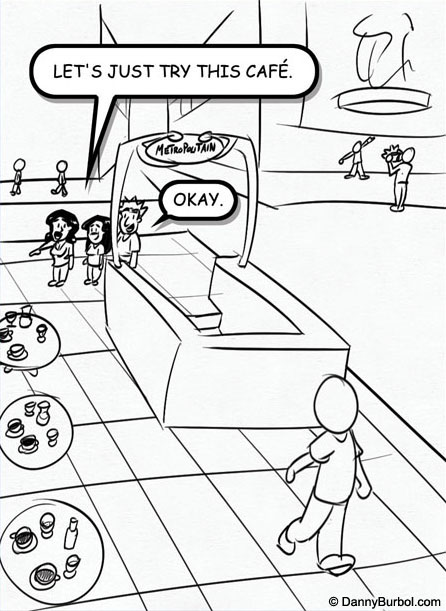
I've been making a comic journal and a vacation comic journal (as you can tell by the links at the top of the page). In both cases I knew I had a lot of ground to cover in a short amount of time. I needed a style that would get the point of the content across to the viewer but also something that was moderately fast to crank out. So I went with a loosely drawn Sunday comic strip style. It worked great. The looseness of the lines kept me moving and discouraged me from getting bogged down and spending 3 hours adding excessive detail to an otherwise lighthearted story.
However, one day I went back and cleaned up one of the pages and realized that it looked better. Not night and day, but definitely better. Here's an example: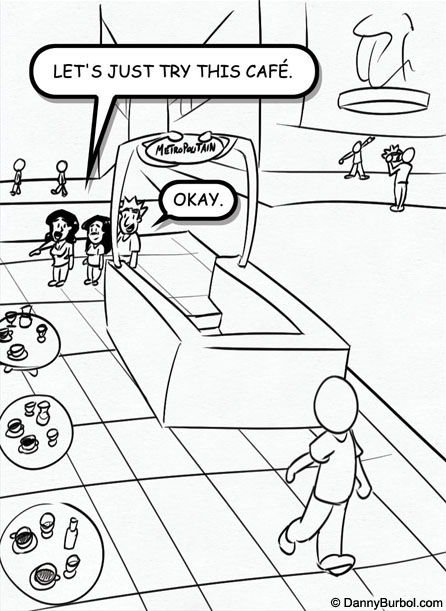
I thought loose drawing *had* to look sloppy. I thought having lines meet in overlapping intersections was what made it classified as "loose drawing." However, now I realize you can still have a loose drawing with clean lines and corners. And I think it looks better. So, yes, I went back and cleaned up every page.
It's really surprising how fast a few clicks of the eraser tool can really cleanup a sketch. I'll definitely be setting aside more time to cleanup my work more often.
Labels:
Draw,
Observation
Monday, February 4, 2008
Tell A Friend About Creative Commons
(Image From: lukeroberts on deviantart)
Well, I've finally arrived. I had my first piece of art ripped off yesterday. It was an accident really, the person meant well, but none the less, they took an image I spent hours making and pasted it right into their own work.
I always knew these things happen to artists, but it's pretty unsettling when it happens to you. Thankfully, it was exactly what I thought, just someone who meant well, but didn't realize they were crossing a line when they used it without asking permission first.
This is the reply I sent to him. Please, educate your friends and family about Creative Commons so we can all be creative together without stepping on each other's toes.
Hey man, thanks for taking it down. but I just want to make sure you know I'm not angry or mad at you. I had a feeling it was an accident, but it was a very unsettling feeling to see how easily things can get ripped off (even with the best of intentions).
believe it or not, I was more worried about you than my image. I'm not too broken-up about it, but I was worried you might accidentally tick someone off someday if I didn't speak up. (as in, tick off someone with lawyers or something)
the good news is, it's really easy to tell when artists do and don't want others to edit their work.
Just look for: "Creative Commons" here's a link to wikipedia:
http://en.wikipedia.org/wiki/Creative_commonsFlickr has Creative Common options and I noticed that DeviantArt is doing it now too. So just look for that and you should be all set to have fun with an image.
Here's an example: http://lukeroberts.deviantart.com/art/Creative-Block-43033454
notice the (CC) instead of (C)?
Pass on the word. The more people who know about these things, the better.
Best of Luck to You,
~Danny
Labels:
Observation



